
Behind every well-designed product, there is a critical moment that nobody mentions in kickoff meetings but everyone ends up suffering through: the moment when the model is already approved, the client is waiting for visual materials, and the team realizes that producing quality renders is going to take days they don’t have.
The model exists. The design is solid. But converting it into an image that convinces someone who can’t read a CAD file — a buyer, a director, a marketing team — remains a bottleneck that repeats itself project after project, without anyone having formally resolved it.
This is the underlying problem faced today by most industrial design studios, product engineering teams, and manufacturing consultancies working with end clients: the visualization pipeline is broken, and nobody identifies it as a tool problem because everyone assumed “that’s just how it works.”
Why Rendering Remains the Bottleneck of Product Design
Modern industrial design workflows have evolved considerably over the last decade. Parametric modeling, FEM simulation, generative design, cloud collaboration — all of that has improved. But the moment of producing professional visualizations still depends, in many teams, on workflows that haven’t changed in years.
The problem has several layers:
CAD-integrated rendering isn’t enough. SolidWorks, Rhino, CATIA, or Creo have native render engines, but none of them were designed to produce commercial-grade images quickly. Setting up lighting, materials, and camera within those tools requires additional technical knowledge, and the results frequently need manual post-processing in Photoshop before they’re ready for a presentation.
External 3D artists create dependency and delays. Outsourcing renders to a visualization studio makes sense when there’s time and budget. But in the real context of a product design project — where the client requests changes, the color is modified in the last meeting, or the surface finish is adjusted in the final review — waiting 48 hours to receive updated renders from an external vendor is simply not viable.
Fast renders sacrifice quality. When the team needs images for tomorrow, it produces fast images. Generic materials, default lighting, neutral backgrounds. Images that communicate geometry but not the product experience. And those images are the ones that make it into approval meetings, sales decks, and in many cases, catalogs.
The economic impact of this problem is concrete: companies that adopt quality 3D product visualization report 60% less time to market by eliminating physical prototypes, conversion rates 40% higher compared to traditional product photography, and a 25% reduction in returns thanks to better customer understanding of the product. The gap between teams that handle their visualization pipeline well and those that don’t translates directly into business results.
KeyShot Studio: The Industry Standard for Product Visualization
KeyShot started as a solution to make product renders look stunning without a steep learning curve. Today it has evolved into a complete visualization suite, used by professionals in industries including automotive, furniture, consumer electronics, and industrial equipment worldwide.
Its value proposition is not to be the most technically powerful render engine on the market in absolute terms. Its proposition is to be the professional renderer that an industrial designer can use without needing to become a rendering specialist. You import the model, apply materials with drag and drop, configure lighting and cameras in a few clicks, and can now explore new directions instantly with a text prompt using KeyShot Studio AI.
This conceptual difference is what explains why nearly 3,000 companies of all sizes and thousands of 3D artists worldwide use KeyShot in their workflows. It’s not software for specialists — it’s software that gives the design team back control of the visualization pipeline.
What a Design Team Can Do With KeyShot in Their Stack
Direct integration with the CAD software you already use
With native support for more than 30 CAD file formats — including Creo, SolidWorks, Rhino, and Fusion 360 — you import the model, apply realistic materials, configure lighting, and render without any intermediate steps. No conversions, no geometry loss, no need to reconstruct the model in another environment.
When the model is updated in the source software — because the client requested a radius change, because engineering modified a tolerance — KeyShot updates the render while preserving the materials, lighting, and camera configuration you had already applied. This eliminates one of the biggest pipeline headaches: reconfiguring the render from scratch every time the model changes.
A material library that reproduces physical reality
KeyShot includes more than 750 scientifically accurate materials — from polished metals and soft fabrics to translucent plastics and frosted glass — that can be applied with drag and drop or created from scratch. Each material is calibrated to reproduce how light behaves in contact with that surface in the real world.
For designers working with CMF (Color, Material, Finish) specifications, this is critical. Presenting a product in black anodized aluminum is not the same as presenting it in natural brushed aluminum, and that difference needs to be perceptible in the render for the client to make informed design decisions. With more than 175 Pantone colors integrated, KeyShot guarantees color accuracy that matches real production standards.
Real-time renders that accelerate decisions
KeyShot’s real-time ray tracing engine shows changes instantly as you work, which accelerates the design process compared to traditional tools that require long waiting times between adjustments. Every material modification, every camera angle change, every lighting adjustment is reflected immediately in the viewport.
In practical terms: a materials review that previously meant launching renders, waiting, evaluating, and relaunching — a cycle that could take several hours — now happens in minutes within a single working session.
Animations and interactive visualizations
KeyShot doesn’t only produce static images. Using keyframes and camera trajectories, you can create everything from simple 360-degree turntables to complex exploded views of assemblies — ideal for product demos, marketing materials, or client walkthroughs.
To this is added KeyShot Web, which allows creating interactive visualizations that clients can explore from their browser — rotating the product, changing materials, comparing variants — without needing to install any software. For teams presenting to remote clients or wanting to offer an online product configurator, this represents a qualitative leap over sending static renders by email.
KeyShot Studio 2026: The Updates That Change the Workflow
Version 2026.1 of KeyShot Studio, released in March 2026, is the most recent release and concentrates capabilities that directly address the current challenges of product design teams:
AI Shots with full editing mode
In KeyShot 2026.1, AI Shots incorporates a new editing mode that allows transforming, replacing, upscaling, and refining already-generated images directly within KeyShot. Transform mode allows modifying existing images based on a prompt — changing components, modifying colors, moving elements, or placing the product in a different context. Replace mode allows painting a mask over the image and describing the desired change in that region.
AI Shots in 2026.1 uses a highly customized version of the Qwen AI model, trained specifically to work with CAD data, and continues running locally on the user’s machine with no significant changes to hardware requirements.
Significantly improved GPU performance
The enhanced GPU mode accelerates material evaluation and rendering of scenes with complex materials, with better performance also in marquee selections in scenes with many parts. For studios working with complex assemblies or products with multiple finish variants, this translates into more agile working sessions.
Additionally, rendering animations in headless mode is now up to 3 times faster on average, since the render engine initializes once and renders the entire animation without needing to restart frame by frame.
Integrated Render Queue and new Gallery
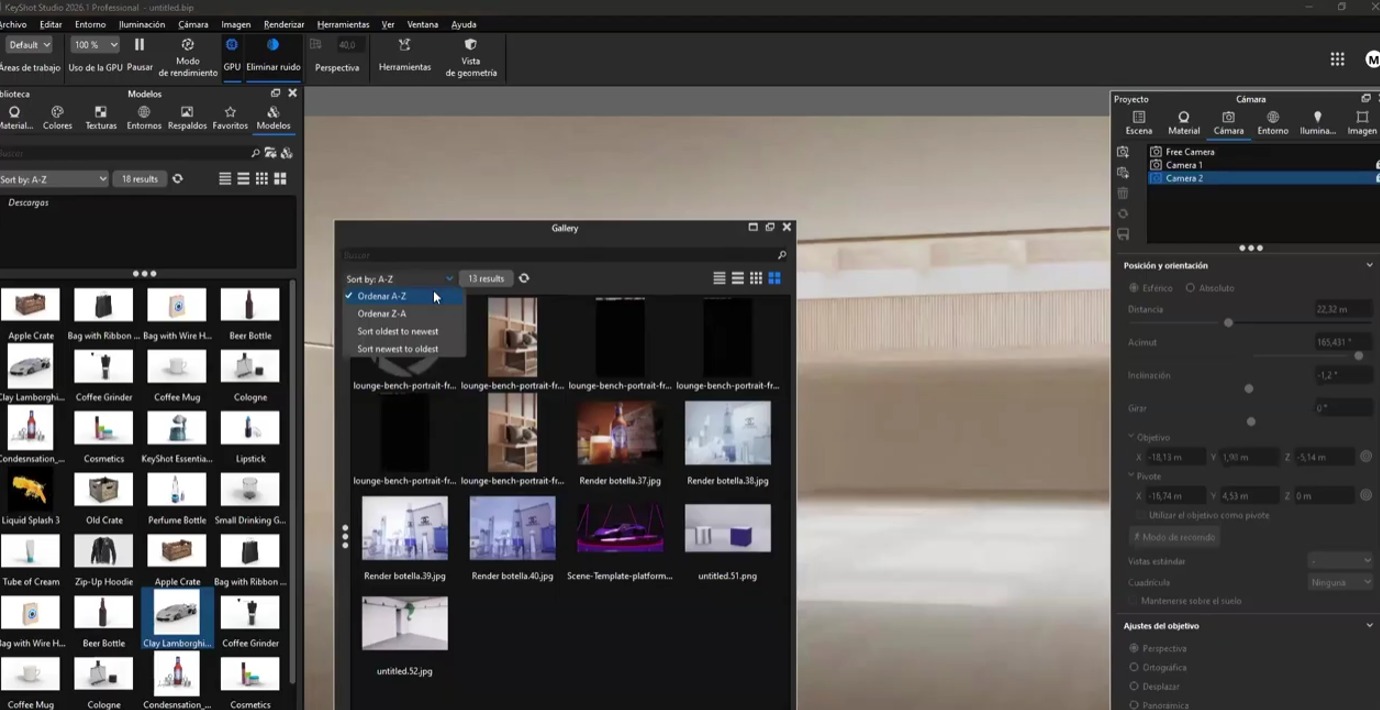
The KeyShot Render Queue — required to use cloud rendering and the Network Rendering service — is now built into KeyShot Studio by default, without a separate installation. The new Gallery window allows browsing and managing rendered files directly within the software. For teams managing multiple simultaneous projects and deliveries, centralizing render management inside the same tool simplifies operations considerably.
IFC and USD with OpenPBR support
KeyShot 2026.1 adds support for importing IFC files, opening the software to architecture and construction workflows oriented toward BIM. For entertainment and production pipelines, OpenPBR material support in imported USD files guarantees material consistency across platforms and applications.
Custom pivots in animations
KeyShot’s animation tools now allow configuring multiple custom pivot points for parts of the object being animated. This is especially useful for creating product demos with articulated movements — doors that open, lids that rotate, mechanisms that unfold — with greater precision and control than in previous versions.
The Industries That Benefit Most
Industries ranging from consumer electronics to automotive design use KeyShot to visualize products, create marketing materials, and communicate design concepts before manufacturing.
In product and industrial design, KeyShot is the standard for presenting concepts to clients, generating color and finish variants, and producing the images that go into catalogs and sales materials — often before a physical prototype even exists.
In manufacturing and engineering, it enables visually documenting assemblies, creating animated assembly guides, and presenting technical proposals with images that any stakeholder can understand, without needing to open the original CAD file.
In consumer electronics and technology, manufacturers of smartphones, laptops, headphones, and appliances use KeyShot to generate the product images that appear on their websites, packaging, and marketing materials — often before mass production has even begun. This allows marketing teams to build campaigns with final product images while engineering is still fine-tuning the last details.
| Industry | Primary Use Case in KeyShot |
|---|---|
| Industrial design | Concept presentations and CMF variants |
| Manufacturing | Visual documentation of assemblies |
| Consumer electronics | Product images for marketing and packaging |
| Automotive | Color and finish exploration for interiors and exteriors |
| Jewelry and watchmaking | Photorealistic simulation of metals and gemstones |
| Architecture and construction | Project visualization and BIM elements (IFC) |
KeyShot vs. Other Options: What to Consider
There are other rendering tools on the market — V-Ray, Lumion, Blender Cycles, among others. Each has its niche. KeyShot’s difference lies in its specialization: it dominates product visualization, and that market position is reflected in every software design decision. For industrial design studios where photorealistic renders are daily deliverables, the return on investment is direct and fast.
While tools like Lumion are optimized for exterior and interior architecture with natural environments, and V-Ray offers maximum technical flexibility at the cost of greater configuration complexity, KeyShot was designed from the ground up for the product lifecycle: from concept to catalog image, through client reviews and interactive demos.
For design teams that don’t want to depend on an external rendering artist or invest weeks learning complex software, KeyShot is the most direct path to a professional result.
The Decision That Changes the Pipeline
Solving the visualization bottleneck is not a marginal improvement. It is a structural change in how the design team communicates its work.
When quality renders stop being a costly, slow step at the end of the process and become something the designer themselves produces in real time during development, the entire workflow changes: client reviews become smoother, approval decisions happen faster, and marketing materials are ready before the product reaches production.
Aufiero Informática distributes KeyShot in Argentina and Latin America. If your team wants to evaluate KeyShot Studio 2026 and find the right license for your workflow, we can help with a personalized demo.