
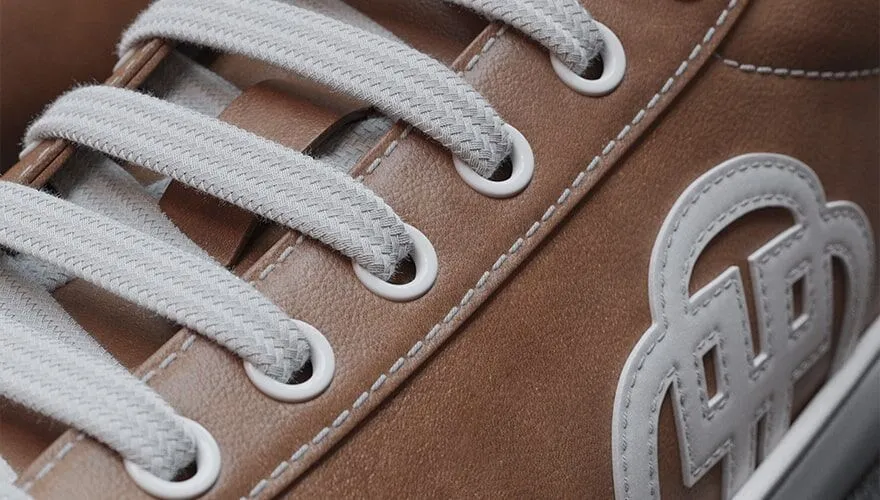
There’s a very specific moment in the online buying process when a customer decides whether to keep going or close the tab. It’s not when they read the price. It’s not when they check the reviews. It’s when they see the product image.
And if that image doesn’t convince them, nothing else matters.
The problem is that many industrial design and marketing teams still work with images that fall short: renders that look “digital,” CAD model screenshots on a white background, or product photography that requires a physical prototype before it can even be used. None of those options is the image that closes a sale.
What a mediocre image actually costs a business
The impact of visual quality on conversion isn’t just intuition — it’s measurable. According to 2025 data, companies that adopt high-quality 3D visualization report conversion rates up to 40% higher than traditional product photography, and a 25% reduction in returns thanks to buyers having a better understanding of the product before purchasing.
Put another way: the buyer who sees a low-quality image doesn’t just not buy. They’re also more likely to return the product if they do purchase it, because the image didn’t accurately represent what they received.
For an industrial design team or a company launching products to market, that cycle of insufficient images → lower conversion → more returns is a cost that’s rarely attributed to the visualization tool — but that’s where it starts.
The problem with the “good enough” render
There’s a trap many product teams fall into: the render used for internal presentations ends up being the same one that goes into the catalog or e-commerce, because producing a better one would require time and resources the project doesn’t have.
The result is an image that “gets the point across” but doesn’t seduce. Materials that look plastic. Flat lighting. Generic backgrounds. The buyer looks at the product and doesn’t desire it, because the render failed to convey the texture of the material, the finish of the metal, the translucency of the glass.
KeyShot solves the problem of slow, hard-to-share product visualization by turning CAD and 3D models into photorealistic renders quickly, with built-in materials, lighting, and environments. Product designers, industrial designers, engineers, and marketing teams use it to compare finishes, present concepts to clients, create website imagery, and reduce reliance on external rendering support.
KeyShot: when the render stops being the bottleneck
KeyShot Studio, with its real-time rendering technology, extensive material library, and intuitive interface, is the ideal tool for bringing ideas to life with striking images. It allows users to create, iterate, and refine renders efficiently, supporting design decision-making and accelerating time to market.
The workflow is designed so that photorealistic results are the starting point, not the destination after hours of configuration. In five simple steps, it’s possible to create impactful images quickly and in real time: import the 3D model, drag and drop materials from a library of over 600 preset options, and the real-time view instantly shows how the material looks with the exact color and lighting.
For teams that need to test color, finish, or material variants without generating a physical prototype for each combination, that changes the entire working dynamic.
AI that accelerates image iteration
The current version, KeyShot Studio 2026.1, adds a layer of artificial intelligence that goes beyond rendering: AI Shots introduces a new editing mode that allows you to transform, replace, scale, and refine existing images directly within KeyShot. Transform mode lets you modify already-approved images via a prompt — changing components, modifying colors, moving elements, or placing the product in a different context. Replace mode lets you paint a mask over the image and describe the desired change in that area.
This means the team can iterate on an already-approved image instead of generating each variant from scratch. For catalogs with multiple colorways or product configurations, the time savings are immediate.
From catalog to e-commerce: images that work across every channel
One of KeyShot’s advantages for teams producing visual content across multiple channels is the versatility of its output formats. It’s not just static images.
KeyShot Studio Web transforms scenes created in KeyShot into fully interactive 360° files, letting the team and clients view and interact with them. It’s also possible to create animations and content for mobile devices. A product the buyer can rotate 360° on an e-commerce page builds more trust than a static image — and that trust translates directly into conversion.
For teams with higher production volumes, KeyShot also supports network rendering, distributing processing across multiple machines to speed up delivery times on large-scale projects.
Compatible with the software you already use
One of the most common arguments against adopting a new rendering tool is the friction of integrating it with an existing workflow. KeyShot addresses this with broad compatibility.
KeyShot imports 3D models from SolidWorks, Solid Edge, SketchUp, Alias, PTC Creo, Rhino, Pro/E, IGES, STEP, FBX, OBJ, and many other formats. With the widest 3D format support on the market and numerous plugins, importing a model is simple and efficient. The designer doesn’t change their modeling software — they simply add KeyShot as the visualization step at the end of the process. RealVNC®
Where Aufiero Informática comes in
KeyShot is distributed by Aufiero Informática, an official distributor with extensive experience in technical and professional software for industrial design and engineering teams.
If your team is still using renders that aren’t up to the quality the product deserves, or if generating image variants takes more time than it should, now is the time to evaluate it.
Try KeyShot with an Aufiero specialist and see the difference before you commit.