
KeyShot

An Introduction to the new AI Shots in KeyShot 2026.1

KeyShot has been using AI as part of the rendering workflow for many years. Denoising and in particular progressive denoising relies on custom trained AI models that speed up the creation of noise-free rendered images. KeyShot 2025.2 introduced a new generative AI workflow called AI Shots. AI Shots enables the creation of images utilizing the CAD model that KeyShot is currently working on. AI Shots relies on a combination of a generally available AI model with an in-house custom fine-tuned AI model to leverage the information provided by the CAD model. AI Shots runs locally on the desktop and does not rely on any cloud services which ensures complete privacy of the CAD model and generated images. 

AI Shots had a number of important goals: Privacy of the images and CAD data, and respecting the CAD model (reducing hallucinations that would cause an AI rendered image of a CAD model to introduce new non-existing features to the CAD model). We have achieved the privacy by running the AI model locally on the end user’s computer. This is a trade-off as it required a powerful GPU to effectively run the AI models. Fortunately, most KeyShot customers have GPUs that they use for ray tracing and the same GPU can be used for AI as well. Secondly, existing AI models have been trained to create images from scratch or based on other images. While an image of a CAD model can provide a good basis we found it insufficient to prevent the AI model from adding details lacking in the model. We therefore have fine-tuned the image generation models to take as input 3D data from the CAD model. This significantly reduces hallucinations and makes it much more likely that the rendered AI image will look like an actual rendering of the CAD model. Based on this fine tuned AI model we have introduced an AI mode called Restyle, where a CAD model can be painted efficiently by AI in order to explore different styles based on a prompt. 

In KeyShot 2026.1 we are introducing a new and vastly improved version of AI Shots that not only improves the quality of the AI generated images but also adds new workflows including editing any images whether generated by AI or rendered in KeyShot. 

 AI Shots in KeyShot 2026.1 requires downloading approximately 16GB of AI model data before it can be used. This data is actually several AI models each optimized to serve specific actions in the AI Shots interface. The core AI model in AI Shots is the Qwen Image Editing model, which has been further custom trained using in-house generated images for the different modes provided by AI Shots. 

Hardware Requirements 

AI Shots requires a recent GPU from either NVIDIA, AMD, or Apple with at least 16GB of memory. It can also run using only the CPU, but this will be much slower than using a dedicated GPU. AI Shots runs on both Windows and Mac OS. AI Shots runs locally on the machine and the computation is therefore completely private. 

Using AI Shots 

AI Shots in KeyShot 26.1 has two major modes: Generating images from the CAD model or editing an existing image. The image generation mode was introduced in KeyShot 25.2, while the editing mode is new in KeyShot 26.1. AI Shots has an option to generate multiple images from the same prompt. This is an effective way to get an image with the desired look as even small variations can have a significant visual influence on the appearance of an image. A difference in 26.1 compared to 25.x is that the prompt can be short and descriptive. AI Shots in 25.x required longer more detailed prompts. It is still possible to use a long prompt, but it is not required. 

Using AI to Generate Images 

AI Shots provide 3 modes for generating images: Restyle, Background, and Imagine

Restyle is a powerful way to use AI to generate images based on the raw CAD model. Restyle ignores the existing materials on the CAD model and with a prompt the user can describe what the CAD model should look like and in what setting the CAD model should be placed. Based on the descriptive text in the prompt the CAD model will be rendered using AI with the materials, lighting, and a setting that matches the description. 

Examples of AI Shots Restyle outputs with the images below given the prompt ‘California Coastal Interior’.  
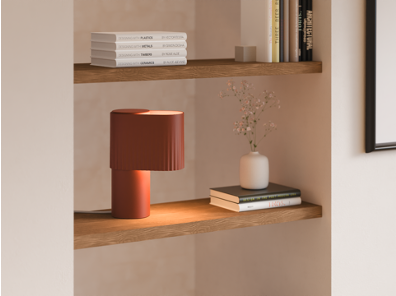
Background takes the rendered CAD model in KeyShot and generates a setting that integrates the CAD model as it looks in KeyShot. AI Shots will strive to match the lighting on the CAD model with the requested background in the prompt. To make the prompt more effective it is best to describe both the product as well as the background in the prompt in order to give AI Shots as much information as possible to work with. 

Rendered CAD in KeyShot model shown on the top. AI Shots Background outputs the two images below given the prompt ‘Lamp in a California Coastal interior. Breezy whites, natural fibers, and relaxed textures to create a space that honors laid-back luxury and celebrates effortless sunshine living.’.  

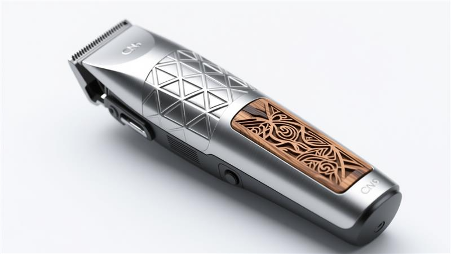
Imagine is a pure generative AI model that ignores the CAD data and simply creates an image based on the prompt. This can be used to explore ideas or to create full backgrounds or textures without taking into account the CAD model in KeyShot.

Examples below with the prompt: ‘Photoreal electric trimmer, aerospace-grade titanium shell with CNC-milled geometric surface pattern, hand-carved bog oak inlay panels set flush into the body, contrast between cold metallic precision and warm organic grain, isometric three-quarter view, white seamless background, KeyShot-style studio render’ 
Using AI to Edit Images 

In KeyShot 2026.1 AI Shots is enhanced with a new powerful editing capability. As with generating images there are multiple modes for editing: Transform, Replace, and Upscale. The modes work on both AI generated images and images rendered in KeyShot (including screenshots). 

Transform makes it possible to change existing images based on a prompt. This can be any change such as removing components, changing colors, moving an item, or placing a product in a specific setting. 

Examples of Transform below: AI Shots Transform can be used to take an image of a product such as the toy airplane and place it in a setting. The image on the right uses the prompt ‘A kid plays with the airplane’. 
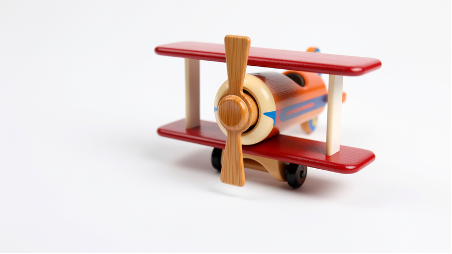
Replace is similar to Transform except the change is made to a specific region highlighted by the user. With Replace, AI Shots will only make a localized change. This can be used to delete specific items, change a specific material, or add a feature in a specific location. 

AI Shots Replace can be used to edit regions in an image. Taking the examples below, where AI Transform also added other toys on the sand. On the right the image shows the output given a mask over the toys on the sand and the prompt ‘Just Sand’. 
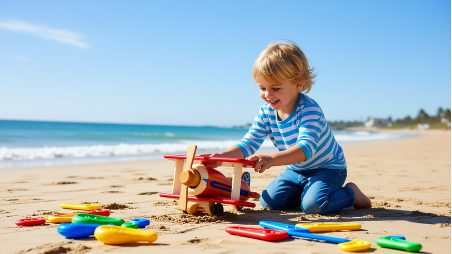
Upscale is using AI to increase the resolution of images either by 2x or 4x. AI will add details where needed. This is a quick way to get a higher resolution image. No prompt is required for upscaling images. 

Examples of AI Shots Upscale: Left original image, right upscaled version (2x). Notice the added detail and crisper edges in the upscaled version. 

AI Shots Workflows 

Below is an example of AI Shots workflows that show how an image can be created using a mix of restyle and editing operations. 
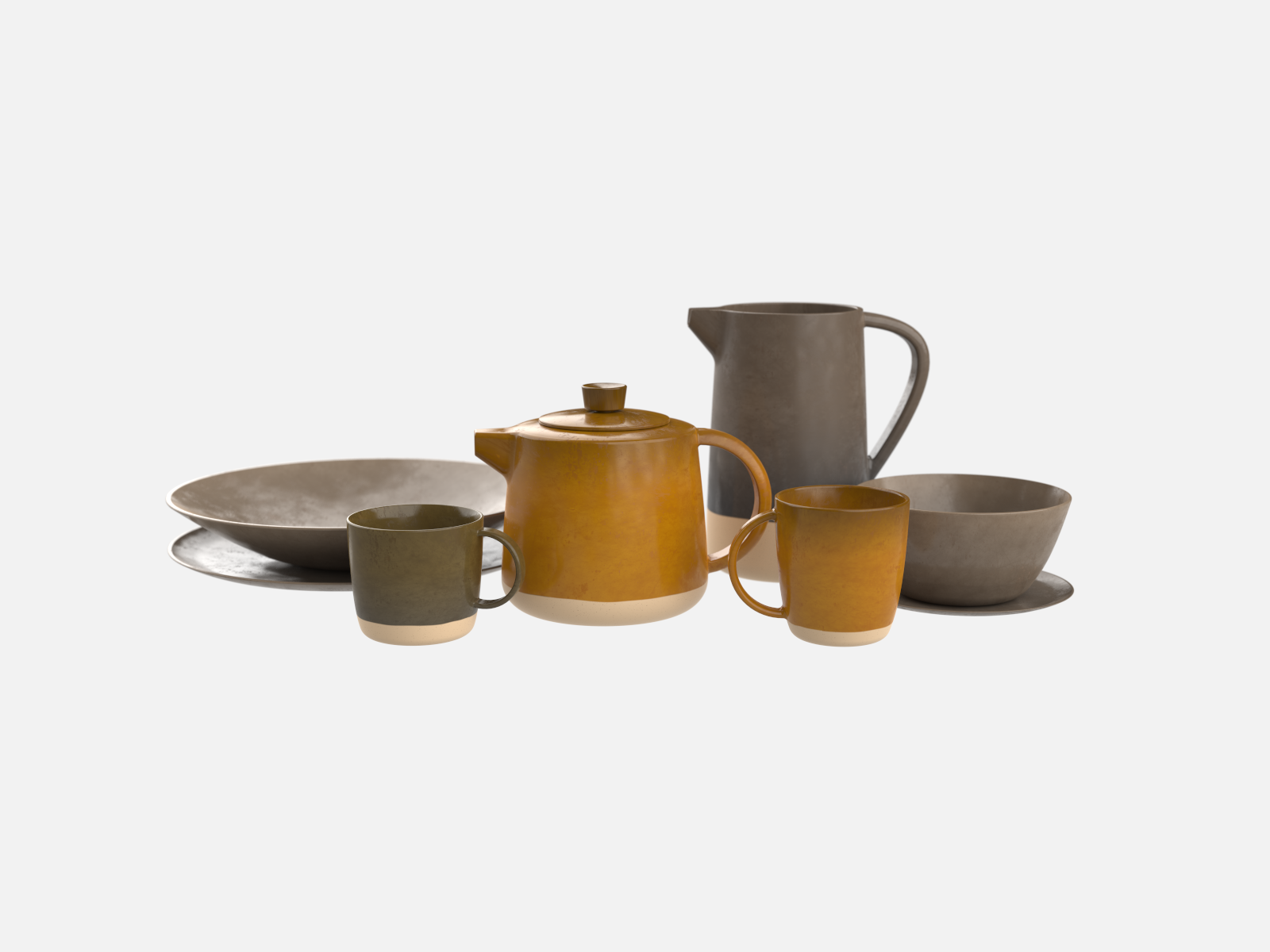
Starting with a Visune scene with tableware.
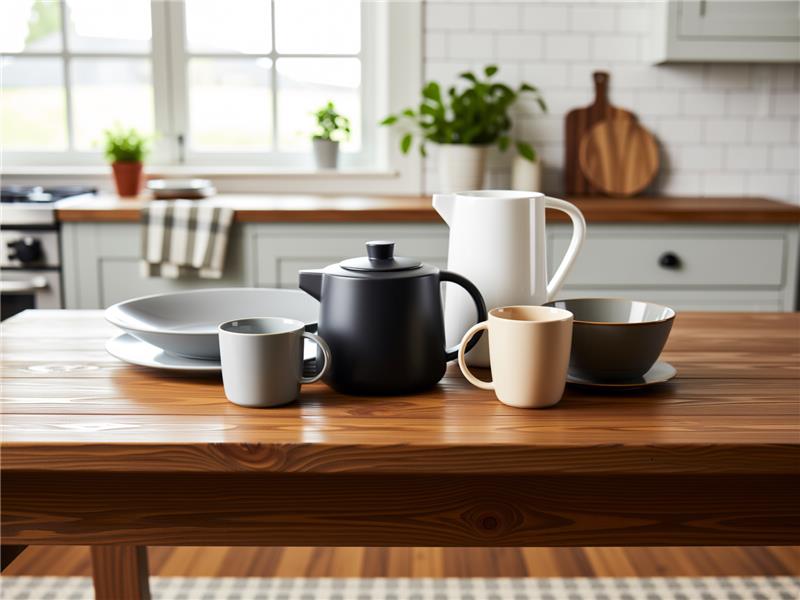
Use Restyle with the prompt ‘Contemporary tableware in a Farmhouse interior. The tableware has varying colors, finishes and textures.’

Then to add life to the scene, a number of Replace Edits.

 1st Replace :

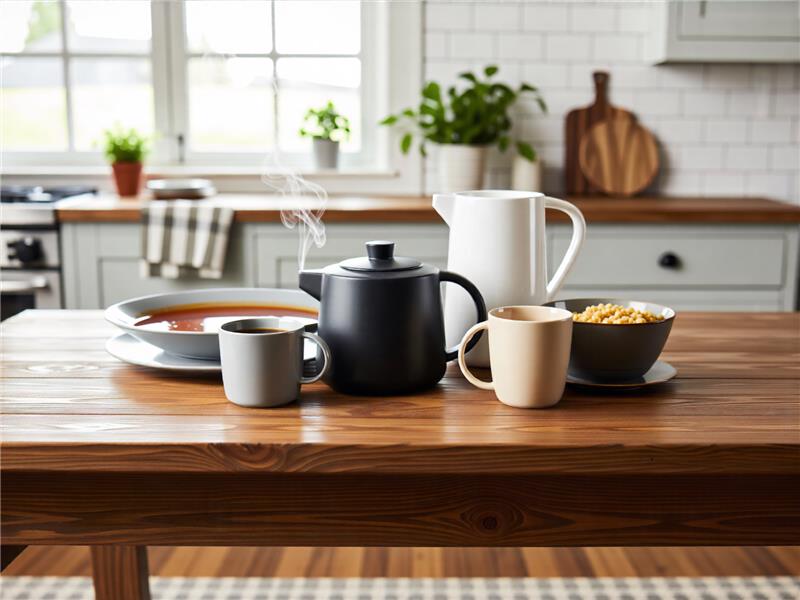
Added a puff of steam using a mask painted above the pot.

2nd Replace:

Added coffee in the left mug using a mask painted at the top of the mug.

3rd Replace:

Added soup in the large dish using a mask painted on the inside of the dish.
4th Replace:

Added cereal in the bowl.

5th Replace:

Added a spoon to the cereal bowl.

5th Replace:

Added a spoon to the cereal bowl.
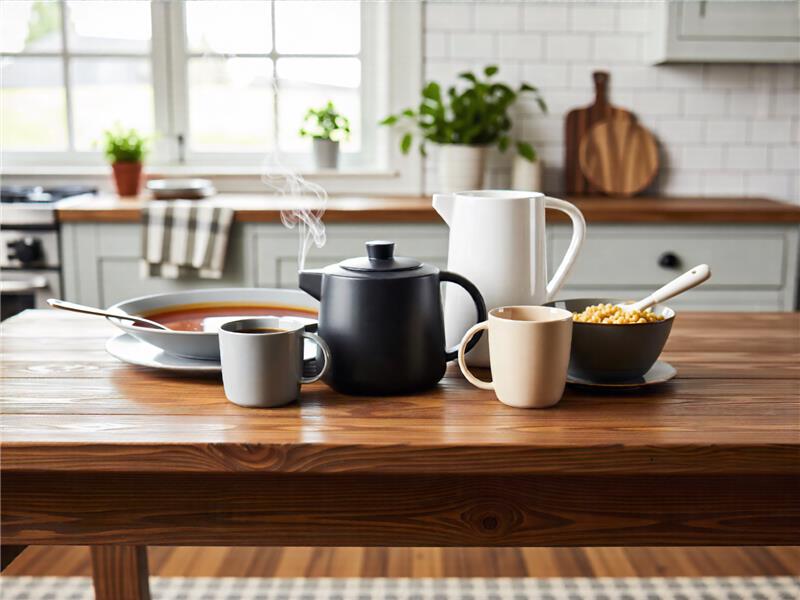
6th Replace:

Added a metal spoon to the soup dish.
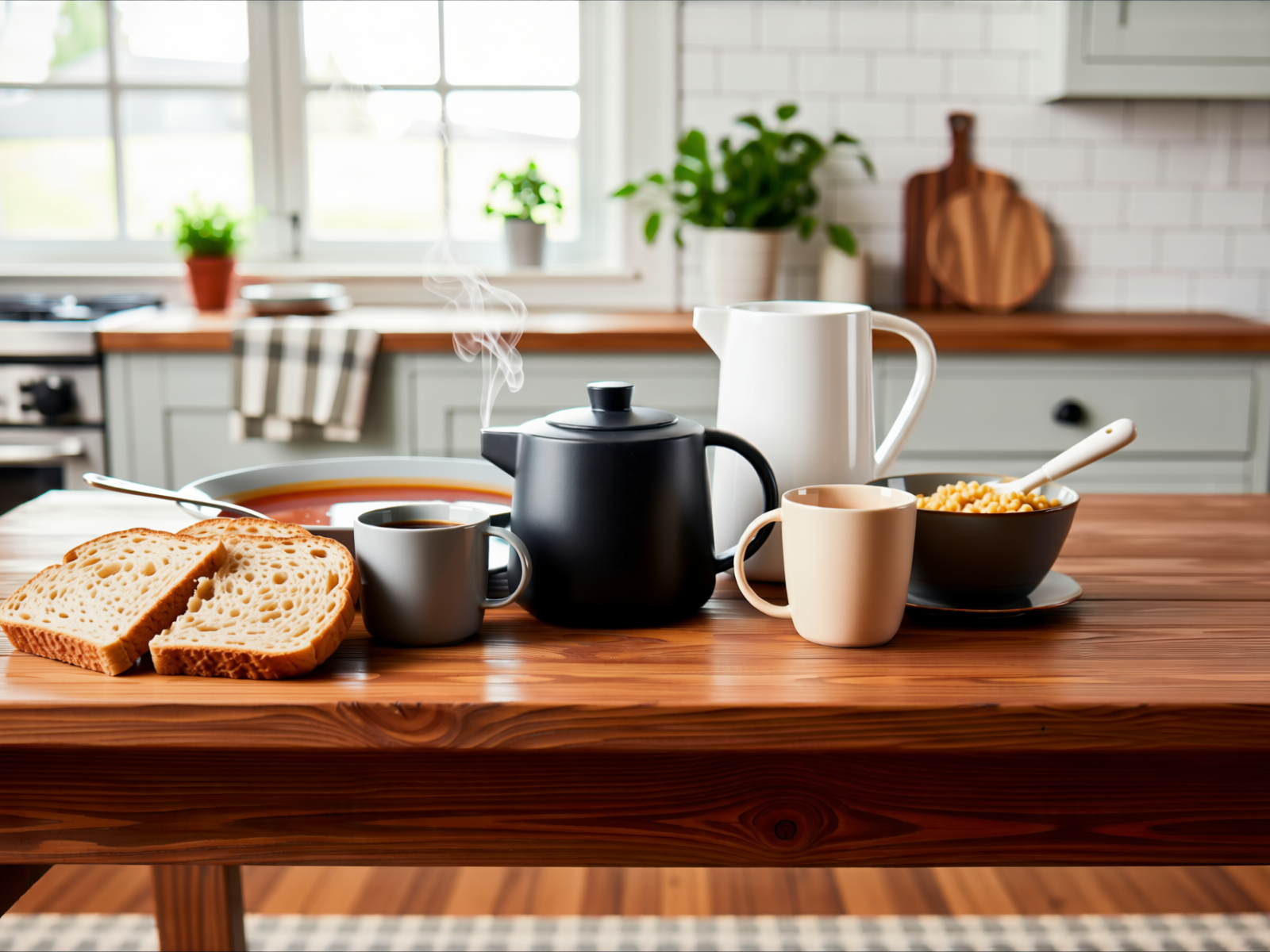
Then use  Transform for adding bread to the image.

Transform was specifically instructed to place a few slices of bread to the left of the soup dish.

One final Transform to make it late evening with cosy indoor lighting.

AI Shots Performance 

AI Shots runs best with a recent GPU from either NVIDIA, AMD, or Apple. It can run using a CPU, but this is generally much slower than using a dedicated GPU. To highlight the performance of different hardware platforms we have tested AI Shots on the following hardware: 

  • NVIDIA Blackwell Max-Q 96GB
  • AMD R9700 AI PRO
  • MacBook Pro M5Max (36GB, 32 GPU Cores)
  • AMD Ryzen Threadripper PRO 9995WX

Benchmark 

We performed benchmark tests for Restyle at 1024×1024 resolutions. 

Above: Time taken to generate a single 1024×1024 image using AI Shots Restyle. 

Conclusion 

AI Shots in KeyShot 2026.1 is a major upgrade that significantly improves the quality and capability of AI Shots. In KeyShot 2026.1 new editing capabilities have been introduced that makes it faster and easier to make changes to images whether rendered in KeyShot or generated with AI Shots. 

AI Shots remain unique in that it has been trained to respect the 3D CAD model. The reason for this custom training is to minimize any unwanted changes to the CAD model, where AI might add features or components that do not exist in the original CAD data. 

Another unique feature of AI Shots is that it runs entirely local using the users GPU or CPU to run the AI model. No CAD data, prompt, or any other data is uploaded to the cloud ensuring full privacy of the CAD model and generated images. 

KEYSHOT 10.2 YA ESTÁ DISPONIBLE

Hoy lanzamos KeyShot 10.2. Hemos introducido algunas funciones nuevas geniales con KeyShot 10, y las actualizaciones con KeyShot 10.2 completan el enfoque con KeyShot 10 en las áreas de materiales, geometría y flujo de trabajo. En cada uno de ellos, las mejoras de rendimiento y uso han seguido siendo una prioridad. A la cabeza de las nuevas funciones se encuentran importantes mejoras para las cáusticas, una biblioteca de materiales renovada, un nuevo estilo de configurador fácil de tocar y una nueva herramienta de simplificación de mallas con nuevas opciones de importación y muchas otras mejoras en los materiales, la interfaz de usuario y las características del flujo de trabajo.

Car- Keyshot - Aufiero Informática

Características destacadas de KeyShot 10.2

A continuación, se destacan las principales características de KeyShot 10.2. Más detalles y ejemplos de las nuevas funciones de KeyShot 10 están disponibles en keyshot.com/whats-new/. La lista completa de funciones y mejoras de KeyShot 10, con información sobre el funcionamiento de cada una de ellas, está disponible en la Guía de Novedades de KeyShot 10. Las principales novedades son:

Cáusticas
Se ha desarrollado un nuevo algoritmo de cáusticas para KeyShot 10 con mejoras adicionales de refinamiento y velocidad realizadas en KeyShot 10.2. El nuevo algoritmo puede manejar miles de luces, se ejecuta increíblemente rápido en las nuevas GPU NVIDIA RTX Ampere y permite que los detalles finos y las estructuras en las cáusticas se vean en una fracción del tiempo, tanto de cerca como de lejos. Además, se han mejorado las cáusticas para conseguir una iluminación ambiental suave y un brillo más uniforme. Más información sobre el renderizado de cáusticas en KeyShot en la GPU.

keyshot-10-caustics-david-merz-Aufiero Informática

Pinturas Axalta

El conjunto único de materiales de pintura Axalta de KeyShot ahora ofrece la capacidad de agregar escamas de metal a la pintura con nuevas opciones de tamaño de escamas y densidad de escamas. Además, las escamas de metal se distribuyen aleatoriamente y se ajustarán al reflejo especular y al color del material de pintura Axalta subyacente.

Biblioteca de materiales

La biblioteca de materiales de KeyShot ha sido completamente renovada con nuevas miniaturas específicas de los materiales para visualizar su apariencia y propiedades con mayor precisión. Con esto, los usuarios ahora tienen la opción de seleccionar el estilo de miniatura de siete plantillas diferentes para materiales preestablecidos, descargados o recién creados. Con esto, la biblioteca ahora cargará los recursos dinámicamente, y ya no se bloqueará la biblioteca durante la carga. Nota: se recomienda utilizar el instalador completo para cargar esta nueva función.

Configurador táctil

Touch-Friendly es un nuevo estilo de diseño disponible en Configurator Wizard que proporciona una interfaz mínima y fácil de tocar para el modo de presentación. El nuevo estilo ofrece opciones de personalización específicas para los elementos de la interfaz, como el tamaño, el color, el estilo y las opciones de iconos. Los configuradores anteriores se pueden actualizar para usar el nuevo estilo eligiendo Touch-Friendly en las opciones de estilo de diseño.

Herramienta de simplificación de malla

Simplificación de malla es una nueva herramienta de geometría que permite al usuario reducir el número de triángulos en una malla mientras mantiene la forma general. Esto es útil para simplificar la geometría para su uso posterior en KeyVR u otras aplicaciones AR donde el rendimiento depende de la cantidad de triángulos en el modelo. Esta herramienta es similar a la herramienta Re-Tessellate que requiere NURBS para calcular la nueva malla. Para los modelos que no tienen NURBS, la nueva herramienta de simplificación de malla evita la necesidad de reducir la calidad del software de modelado sólo para volver a importarlo en KeyShot. Obtenga más información sobre la simplificación de la malla.

Características adicionales Otras actualizaciones que los usuarios encontrarán en KeyShot 10.2 incluyen: Vincular materiales duplicados: permite a los usuarios encontrar y agregar fácilmente materiales de escena que sean iguales. Pintura metálica: se ha mejorado el aspecto visual de las pinturas metálicas con rugosidad de revestimiento transparente. Dividir superficies de objetos: la herramienta Dividir superficies de objetos tiene una nueva opción de selección de pinceles. Exportación/Importación: Materiales mejorados para la exportación de USD/glTF, además de la nueva importación de glTF y la compresión de Draco para la exportación; importación de FBX mejorada; soporte actualizado para Creo View, CATIA V5, Jt (hasta 10.6), Parasolid (hasta 33.1); soporte para Maya 2022, SketchUp 2021 Versión sin cabeza: mejorada para proporcionar más funciones y y un ejecutable separado.

KEYSHOT 10.2 AGORA DISPONÍVEL

Hoje, lançamos o KeyShot 10.2. Introduzimos alguns novos recursos excelentes com o KeyShot 10 e as atualizações com o KeyShot 10.2 completam o foco com o KeyShot 10 nas áreas de materiais, geometria e fluxo de trabalho. Em cada um deles, as melhorias no desempenho e no uso permaneceram uma prioridade. Liderando os novos recursos estão as principais melhorias para cáusticos, uma biblioteca de materiais renovada, um novo estilo de configurador amigável ao toque e uma nova ferramenta de simplificação de malha, junto com novas opções de importação e muitas outras melhorias em materiais, interface de usuário e recursos de fluxo de trabalho.

Car- Keyshot - Aufiero Informática

Destaques do recurso KeyShot 10.2

O seguinte destaca os principais recursos do KeyShot 10.2. Mais detalhes e exemplos dos novos recursos do KeyShot 10 estão disponíveis em keyshot.com/whats-new/. A lista completa de recursos e melhorias no KeyShot 10, junto com informações sobre como cada recurso funciona, está disponível no Guia de Novidades do KeyShot 10. Os novos recursos principais incluem:

Cáusticos
Um novo algoritmo cáustico foi desenvolvido para o KeyShot 10 com refinamento adicional e melhorias de velocidade feitas no KeyShot 10.2. O novo algoritmo pode lidar com milhares de luzes, roda incrivelmente rápido nas novas GPUs NVIDIA RTX Ampere e permite que detalhes e estruturas finas nos cáusticos sejam vistos em uma fração do tempo, tanto de perto quanto à distância. Além disso, os cáusticos foram aprimorados para uma iluminação suave do ambiente e um brilho mais consistente. Leia mais sobre como renderizar cáusticos no KeyShot na GPU.

keyshot-10-caustics-david-merz-Aufiero Informática

Tintas Axalta

O conjunto exclusivo KeyShot de materiais de pintura Axalta agora oferece a possibilidade de adicionar flocos de metal à tinta com novas opções de Tamanho de Floco e Densidade de Floco. Além disso, os flocos de metal são distribuídos aleatoriamente e corresponderão à reflexão especular e à cor do material de pintura Axalta subjacente.

Biblioteca de Materiais

A Biblioteca de Materiais KeyShot foi completamente refeita com novas miniaturas específicas de materiais para visualizar a aparência e as propriedades do material com mais precisão. Com isso, os usuários agora têm a opção de selecionar o estilo de miniatura entre sete modelos diferentes para materiais predefinidos, baixados ou recém-criados. Junto com isso, a biblioteca agora carregará recursos dinamicamente, não travando mais a biblioteca durante o carregamento. Nota: é recomendado usar o instalador completo para carregar esta nova funcionalidade.

Configurador Touch-Friendly

Touch-Friendly é um novo estilo de layout disponível no Configurator Wizard que fornece uma interface mínima e touch-friendly para o modo de apresentação. O novo estilo oferece opções de personalização específicas para os elementos da interface, incluindo opções de tamanho, cor, estilo e ícones. Os configuradores anteriores podem ser atualizados para usar o novo estilo, escolhendo Touch-Friendly nas opções de Estilo de Layout.

Ferramenta de simplificação de malha

Mesh Simplification é uma nova ferramenta de geometria que permite ao usuário reduzir o número de triângulos em uma malha enquanto mantém a forma geral. Isso é útil para simplificar a geometria para uso posterior em KeyVR ou outros aplicativos de AR onde o desempenho depende do número de triângulos no modelo. Esta ferramenta é semelhante à ferramenta Re-Tessellate que requer NURBS para calcular a nova malha. Para modelos que não possuem NURBS, a nova ferramenta Mesh Simplification evita a necessidade de reduzir a qualidade do software de modelagem apenas para reimportá-lo para o KeyShot. Saiba mais sobre simplificação de malha.

Características adicionais Outras atualizações que os usuários encontrarão no KeyShot 10.2 incluem: Vincular materiais duplicados: permite que os usuários localizem e vinculem facilmente os materiais da cena que são iguais. Tinta metálica: aparência visual melhorada de tintas metálicas com rugosidade de revestimento transparente Dividir superfícies de objeto: a ferramenta Dividir superfícies de objeto tem uma nova opção de seleção de pincel Exportação / Importação: materiais aprimorados para exportação de USD / glTF mais novo glTF Import e compressão Draco para Exportação; importação de FBX aprimorada; suporte atualizado para Creo View, CATIA V5, Jt (até 10.6), Parasolid (até 33.1); suporte para Maya 2022, SketchUp 2021 Versão sem cabeça: aprimorada para fornecer mais funções e executável separado

KEYSHOT 10.2 NOW AVAILABLE

Today, we release KeyShot 10.2. We've introduced some great new features with KeyShot 10 and the updates with KeyShot 10.2 round out the focus with KeyShot 10 in the areas of materials, geometry, and workflow. Across each of these, improvements in performance and usage have remained a priority. Leading the new features is major improvements for caustics, a revamped Materials Library, a new touch-friendly Configurator style, and a new Mesh Simplification Tool, along with new import options and many other improvements across materials, user interface, and workflow capabilities.

Car- Keyshot - Aufiero Informática

KeyShot 10.2 Feature Highlights

The following highlights the top features in KeyShot 10.2. More details and examples of the new capabilities across KeyShot 10 are available at keyshot.com/whats-new/. The entire list of features and improvements in KeyShot 10, along with information on how each feature works, is available in the KeyShot 10 What’s New Guide. Key new features include:

Caustics
A new caustic algorithm was developed for KeyShot 10 with additional refinement and speed improvements made in KeyShot 10.2. The new algorithm can handle thousands of lights, runs blazingly fast on the new NVIDIA RTX Ampere GPUs, and allows details and fine structures in the caustics to be seen in a fraction of the time, both up close and at a distance. Additionally, caustics have been improved for smooth environment lighting and more consistent brightness. Read more about Rendering Caustics in KeyShot on the GPU.

keyshot-10-caustics-david-merz-Aufiero Informática

Axalta Paints

The KeyShot exclusive set of Axalta paint materials now offer the possibility of adding metal flakes to the paint with new options for Flake Size and Flake Density. Additionally, the metal flakes are randomly distributed and will match the specular reflection and color of the underlying Axalta paint material.

Materials Library

The KeyShot Materials Library has been completely re-done with new material-specific thumbnails to visualize material appearance and properties more accurately. With this, users now have the option to select the thumbnail style from among seven different models for preset, downloaded, or newly created materials. Along with this, the library will now load resources dynamically, no longer locking the library while loading. Note: it is recommended to use the full installer to load this new functionality.

Touch-Friendly Configurator

Touch-Friendly is a new Layout Style available in the Configurator Wizard that provides a minimal, touch-friendly interface for Presentation mode. The new style provides customization options specific to the interface elements including options for size, color, styling, and icons. Previous configurators may be updated to use the new style by choosing the Touch-Friendly in the Layout Style options.

Mesh Simplification Tool

Mesh Simplification is a new Geometry Tool that allows a user to reduce the number of triangles in a mesh while keeping the overall shape. This is useful to simplify geometry for later use in KeyVR or other AR applications where performance relies on the number of triangles in the model. This tool is similar to the Re-Tessellate tool that requires NURBS to calculate the new mesh. For models that do not have any NURBS, the new Mesh Simplification tool prevents the need to reduce the quality in the modeling software only to re-import it into KeyShot. Learn more about Mesh Simplification.

Additional Features Other updates users will find in KeyShot 10.2 include: Link Duplicate Materials: allows users to easily locate and link scene materials that are the same. Metallic Paint: improved visual appearance of metallic paints with clear coat roughness Split Object Surfaces: Split Object Surfaces Tool has a new brush select option Export/Import: improved materials for USD/glTF export plus new glTF Import and Draco compression for Export; improved FBX import; updated support for Creo View, CATIA V5, Jt (up to 10.6), Parasolid (up to 33.1); support for Maya 2022, SketchUp 2021 Headless version: improved to provide more functions and separate executable

KEYSHOT 10.1 AGORA DISPONÍVEL

Hoje, estamos ansiosos para apresentar o KeyShot 10.1. Com o KeyShot 10, a Luxion introduziu gerenciamento de luz consolidado, recursos avançados de quadro-chave e animação de ambiente, o novo Smart Export para uma ampla variedade de opções de saída 3D e uma ferramenta Move completamente redesenhada para melhor acessibilidade e posicionamento.
O KeyShot 10.1 traz adições para complementar o recurso e o fluxo de trabalho com detecção de colisão e resolução de peças, exportação inteligente para vários formatos de AR de uma vez, importação de USD e seleção múltipla para Light Manager e animação de quadro-chave. Junto com essas atualizações, Luxion lançou o Portal KeyShot com uma nova licença de teste para gerenciamento e acessibilidade aprimorados das licenças KeyShot.

Detecção e liquidação de colisão

KeyShot 10.1 inclui Detecção de Colisão básica de objetos, junto com a habilidade de liquidar itens em outros objetos e no solo. Incluído na nova ferramenta Move, Collision Detection and Settle é útil para a configuração da cena quando os objetos precisam de uma disposição mais realista no solo ou entre outros objetos. A detecção de colisão também pode ser usada separadamente como uma maneira fácil de alinhar objetos enquanto os mantém cientes e separados de outros objetos na cena.

Game- Keyshot - AufieroInformatica

Aprimoramentos de exportação / importação inteligente

O KeyShot 10.1 apresenta a capacidade de exportar um arquivo KeyShot em arquivos USDz e GLB separados como parte de um processo de exportação que executa o cozimento e o desempacotamento UV juntos, permitindo a criação fácil de arquivos que funcionam para dispositivos Apple iOS (USDz) e Android / Web (glTF / GLB). O cozimento e o desembrulhamento por UV também podem ser cancelados. A importação de USD também foi adicionada às opções de importação do KeyShot para permitir que você avance a aparência de seu modelo e, em seguida, exporte-o para várias plataformas AR.

Melhorias de iluminação

Para o Light Manager, o KeyShot 10.1 introduz a capacidade de selecionar e controlar várias luzes simultaneamente, fazendo ajustes proporcionais para toda a iluminação de uma cena ou selecionar a iluminação, de forma rápida e eficiente. O KeyShot 10.1 também melhora o uso do Light Gizmo e do Light Manager ao introduzir a capacidade de sincronizar e desfazer alterações usando Ctrl-Z (Windows) / command-Z (Mac) ou através do menu Editar, Desfazer.

Aprimoramentos de animação de quadro-chave

O KeyShot 10.1 apresenta a capacidade de selecionar vários quadros-chave de uma só vez na Linha de tempo da animação, usando Ctrl (Windows) / comando (Mac). Além disso, vários frames-chave podem ser copiados e colados ao longo do mesmo nó usando Ctrl-C + Ctrl-V (Windows) / command-C + command-V (Mac) ou colados como espelhados. Por último, as curvas de atenuação personalizadas agora também podem ser editadas para várias animações ao mesmo tempo.

KEYSHOT 10.1 NOW AVAILABLE

Today, we're excited to bring you KeyShot 10.1. With KeyShot 10, Luxion introduced consolidated light management, advanced keyframe and environment animation capabilities, the all-new Smart Export for a wide variety of 3D output options, and a completely redesigned Move Tool for improved accessibility and placement.
KeyShot 10.1 brings additions to complement both feature and workflow with Collision Detection and Part Settling, Smart Export to multiple AR formats at once, USD Import, and multi-selection for both Light Manager and Keyframe Animation. Along with these updates, Luxion has launched KeyShot Portal with new trial licensing for improved management and accessibility of KeyShot licenses.

Collision Detection and Settle

KeyShot 10.1 includes basic Collision Detection of objects, along with the ability to Settle items on other objects and the ground. Included in the new Move Tool, Collision Detection and Settle is useful for scene setup when objects need a more realistic arrangement on the ground or amongst other objects. Collision Detection may also be used separately as an easy way to align objects while keeping them aware and separate from other objects in the scene.

Game- Keyshot - AufieroInformatica

Smart Export/Import Enhancements

KeyShot 10.1 introduces the ability to export a KeyShot file into separate USDz and GLB files as part of one export process that performs the Baking and UV unwrapping together, allowing easy creation of files that work for both Apple iOS (USDz) devices and Android/Web (glTF/GLB). Baking and UV Unwrapping can now also be canceled. USD import has also been added to the Import options for KeyShot to allow you to advance the appearance of their model then export it to multiple AR platforms.

Lighting Enhancements

For the Light Manager, KeyShot 10.1 introduces the ability to select and control multiple lights simultaneously, making proportional adjustments to the entirety of a scene’s lighting or select lighting, fast and efficient. KeyShot 10.1 also improves Light Gizmo and Light Manager usage by introducing the ability to sync changes and undo changes using Ctrl-Z (Windows)/command-Z (Mac) or via the Edit, Undo menu.

Keyframe Animation Enhancements

KeyShot 10.1 introduces the ability to select multiple keyframes at once from within the Animation Timeline, using Ctrl (Windows)/command (Mac). Additionally, multiple keyframes may be copied and pasted along the same node using Ctrl-C + Ctrl-V (Windows)/command-C + command-V (Mac) or pasted as mirrored. Lastly, Custom Easing Curves may now also be edited for multiple animations at once.

KEYSHOT 10.1 YA DISPONIBLE

Hoy, nos complace presentarles KeyShot 10.1. Con KeyShot 10, Luxion introdujo una gestión de la luz consolidada, funciones avanzadas de animación de fotogramas clave y entornos, la nueva exportación inteligente para una amplia variedad de opciones de salida 3D y una herramienta de movimiento completamente rediseñada para mejorar la accesibilidad y la ubicación.

KeyShot 10.1 trae adiciones para complementar tanto la función como el flujo de trabajo con detección de colisiones y asentamiento de piezas, exportación inteligente a múltiples formatos AR a la vez, importación de USD y selección múltiple para Light Manager y animación de fotogramas clave. Junto con estas actualizaciones, Luxion ha lanzado KeyShot Portal con nuevas licencias de prueba para mejorar la administración y la accesibilidad de las licencias de KeyShot.

Las nuevas características clave incluyen:

Detección y solución de colisiones

En otros objetos y en el suelo. Incluido en la nueva herramienta Mover, Detección y asentamiento de colisiones es útil para la configuración de escenas cuando los objetos necesitan una disposición más realista en el suelo o entre otros objetos. La detección de colisiones también se puede usar por separado como una manera fácil de alinear objetos mientras los mantiene alerta y separados de otros objetos en la escena.

Game- Keyshot - AufieroInformatica

Mejoras inteligentes de exportación / importación

KeyShot 10.1 introduce la capacidad de exportar un archivo KeyShot a archivos USDz y GLB separados como parte de un proceso de exportación que realiza el desenvolvimiento de horneado y UV juntos, lo que permite la creación fácil de archivos que funcionan tanto para dispositivos Apple iOS (USDz) como para Android / Web. (glTF / GLB). Ahora también se puede cancelar el horneado y el desenvuelto UV. La importación de USD también se ha agregado a las opciones de Importación para KeyShot para permitirle avanzar en la apariencia de su modelo y luego exportarlo a múltiples plataformas AR.

Mejoras de iluminación

Para el Light Manager, KeyShot 10.1 presenta la capacidad de seleccionar y controlar múltiples luces simultáneamente, haciendo ajustes proporcionales a la totalidad de la iluminación de una escena o la iluminación seleccionada, de manera rápida y eficiente. KeyShot 10.1 también mejora el uso de Light Gizmo y Light Manager al introducir la capacidad de sincronizar y deshacer cambios usando Ctrl-Z (Windows) / command-Z (Mac) o mediante el menú Editar, Deshacer.

Mejoras en la animación de fotogramas clave

KeyShot 10.1 introduce la capacidad de seleccionar varios fotogramas clave a la vez desde dentro de la línea de tiempo de animación, usando Ctrl (Windows) / comando (Mac). Además, se pueden copiar y pegar varios fotogramas clave en el mismo nodo usando Ctrl-C + Ctrl-V (Windows) / comando-C + comando-V (Mac) o pegar como duplicado. Por último, las curvas de aceleración personalizadas ahora también se pueden editar para varias animaciones a la vez.